




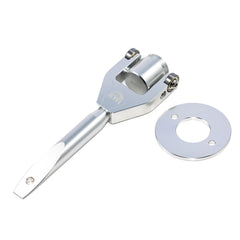
X3 Rapid Belt Change Tool
The KWI X3 Rapid Belt Change Tool is a simple, lightweight aluminum tool designed specifically for the...
- $75.00
- $75.00
- Unit price
- per
Please hurry! Only 0 left in stock
Subtotal:
$75.00
10 customers are viewing this product
Couldn't load pickup availability
Free Shipping
Free standard shipping on select products

The KWI X3 Rapid Belt Change Tool is a simple, lightweight aluminum tool designed specifically for the Can-Am Maverick X3 — making belt removal and installation fast, easy, and frustration-free. No improvising, no fighting the clutch, no wasted time on the trail when you need to get back riding.
Lightweight enough to throw in your gear bag on every ride, and straightforward enough that anyone can use it. If you own a Can-Am X3 and change your own belts, this tool belongs with you every time you head out.
About Domestic Shipments (U.S.)
Please allow 3–7 business days for shipping. We only ship to the lower 48 states.
On some items, our live inventory may be depleted from previous days’ sales. In these cases, we may drop ship the item once it becomes available. If inventory is not in stock at the time of fulfillment, ATU will notify you with a resolution regarding backorder status.
Please be advised that ATU ships from over 10 warehouses across the U.S. In some cases, items may be drop shipped to help speed up delivery times. On heavily discounted parts (i.e. differentials), tracking information may not be provided.
ATU Shipping Daily Cutoff: 3:30 PM (Central Time)
Shipping Support
Our site is always available whenever you want to upgrade your ride. Orders can be placed 24/7/365.
Our passionate customer support team is happy to help with any questions or concerns.
Email: orders@allthingzutv.com
Phone: 256-686-4888
Returns
For returns, please use the link at the top of this page to access our return form. Download, print, and fill out the form completely, then ship it in the same box as the product you are returning.
- Make sure you are logged in to your ATU account.
- Locate the account symbol in the top-right corner next to the search bar.
- Scroll within the dropdown menu and select Orders.
- Find the order you wish to return and click Return Items, located beneath the package status (should read SHIPPED).
- On the return page, select the reason for the return and the desired return action. Add any relevant comments and ensure the quantity of returned items is correct.
- Once submitted, an email notification will be sent to sales@allthingzutv.com.
| Drostique | Nam tempus turpis at metus scelerisque placerat nulla deumantos |
| Pharetro Lorem | Pellentesque diam dolor elementum etos lobortis des mollis |
| Milancelos | Donec pretium egestas sapien et mollis |
| Pellentesque | Sedcus faucibus an sullamcorper mattis drostique des commodo pharetras |
| Proin Molestie | Pellentesque diam dolor elementum etos lobortis des mollis |
| Cosmopolis | Donec pretium egestas sapien et mollis |
Related Products
Recently Viewed Products
- Choosing a selection results in a full page refresh.